Native · Local First

One native app for your passwords.

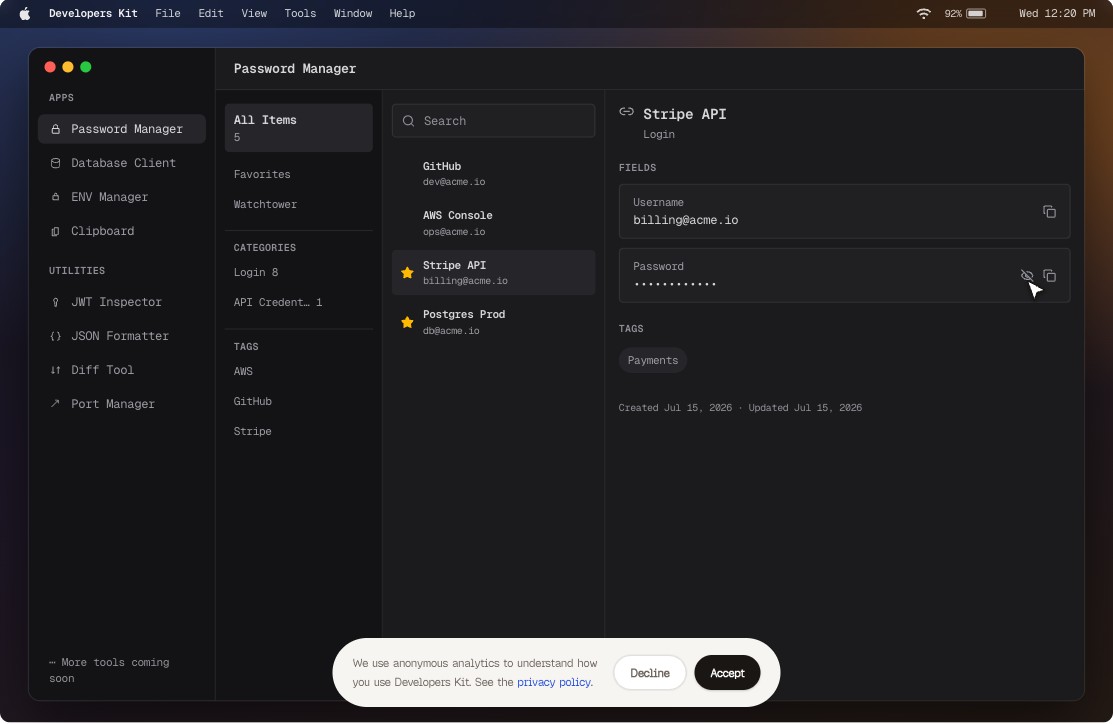
Developers Kit is a native macOS workspace with local-first utilities — password vault, database client, ENV manager, clipboard history, JWT inspector, and more. Everything runs on your Mac. Your data never leaves it.

Download on theMac App StoreNo Account · No Subscription · No Telemetry
Developers Kit demo — the database client tool

One window. Eight tools. Zero network calls you didn’t ask for.

Every utility in Developers Kit does its work on-device. JWTs decode locally. JSON formats locally. Passwords are sealed with AES-256-GCM into a file that never syncs anywhere. The only time Developers Kit touches the network is when you connect to your own database — and even then, a six-level safe mode stands between you and a bad UPDATE.

The essentials

Developer tools for macOS that never send your data anywhere.

Eight focused utilities in one native app — everything local, everything fast.

01CAPTUREnever lose a copy

Everything you copied. One keystroke away.

A clipboard history manager for Mac that captures every copy locally — ⌃⌘V opens a search palette over any app, and OCR makes even screenshots findable.

  • ⌃⌘V palette over any app
  • Screenshots searchable via OCR
  • AWS keys flagged, never stored
  • Pin what matters, forever
02SECUREa vault that never phones home

Passwords stay on this Mac. Verified anyway.

An offline password manager for macOS — AES-256-GCM vault, Touch ID unlock, TOTP codes, and breach checks where only five characters of a hash ever leave the device.

  • AES-256-GCM local vault
  • Touch ID unlock, TOTP built in
  • Breach check via k-anonymity
  • Watchtower flags weak and reused
03STOREsecrets in the Keychain

Env values the Keychain keeps. Not plaintext.

Store environment variables securely on your Mac — every value lives in the macOS Keychain and reveals only after Touch ID, every single time.

  • Values live in macOS Keychain
  • Touch ID on every reveal
  • Export .env when needed
  • Nothing readable on disk
04CONNECTproduction without fear

Postgres to Mongo. One safe window.

A database client for Mac with SSH tunnels for Postgres, MySQL, SQLite, Redis, MongoDB, and DynamoDB — six-level safe mode gates every statement before it runs.

  • Six engines, SSH tunnels
  • Safe mode gates every statement
  • Touch ID before production writes
  • Inline edits preview their SQL
05MONITORport 3000 is busy

See who owns every port. Instantly.

Find the process using any port on your Mac — a live list of every listener with its process and PID, refreshed every two seconds.

  • Live list, process and PID
  • Dev-port filter built in
  • Copy the kill command
  • No more lsof archaeology
06FORMATreadable JSON, locally

Messy JSON in. Readable JSON out.

An offline JSON formatter for Mac — format, minify, validate, sort keys, and walk the tree without your payloads ever touching the internet.

  • Format, minify, validate, sort
  • Tree inspector for nesting
  • Handles big payloads fast
  • Never leaves your Mac
07COMPAREevery change, word by word

Two versions. Every changed word.

A diff tool for Mac that works offline — split and unified views with word-level highlights, no character limits, no upload.

  • Split and unified views
  • Word-level highlights
  • No upload, no limits
  • Paste and compare instantly
08VERIFYtrust, then verify

Decode claims. Actually verify the signature.

An offline JWT decoder with a difference — header, payload, and a claims table, plus real HS256 signature verification against your secret.

  • Header and payload decoded
  • Claims table with dates
  • Real HS256 verification
  • Secrets never leave the device

Native SwiftUI — not another Electron wrapper

Free download. No subscription, no account, no analytics.

Privacy

Local-first isn’t a feature.It’s the whole point.

Developers Kit is sandboxed, notarized, and built for the Mac App Store. There is no telemetry to opt out of, because there is no telemetry.

network_audit --app "Developers Kit"[OK]

scanning outbound connections...0

analytics SDKs found...0

telemetry endpoints...0

No outbound traffic detected

Zero Telemetry

0 analytics SDKs, 0 tracking pixels, 0 crash reporters. Your usage is nobody's data.

jwt_secret_


AES-256-GCM / macOS Keychain

100% On-Device Crypto

Secrets live in the macOS Keychain, sealed with AES-256-GCM. Reveal requires Touch ID.

0 Accounts Required

No sign-up, no login, no cloud sync. Open the app and start working.

CONNECTpostgres://localhost:5432/dev
{ "status": "connected" }9ms

One Kind of Network Call

The only connections it ever makes are the ones you ask for — to your own databases.

Pricing

Free for early birds.Not forever.

Developers Kit becomes a paid app in a future release. Download it while it’s free and it stays yours — App Store purchases never expire.

$0Early-bird price
  • All eight tools — nothing gated
  • Every future update included
  • No subscription, no account, ever
  • Yours forever once downloaded

Questions, answered.

Does Developers Kit send anything off my Mac?+

Two things only, both yours to trigger: connections to your own databases, and the optional password breach check, which sends five characters of a SHA-1 hash (k-anonymity) to Have I Been Pwned. Everything else is on-device.

Can I import from 1Password, Chrome, or Bitwarden?+

Yes — CSV import understands all three formats. Export is CSV too, gated behind Touch ID.

Which databases does it support?+

PostgreSQL, CockroachDB, MySQL, MariaDB, SQLite, Redis, MongoDB, and DynamoDB — with SSH tunneling for the ones behind a bastion.

Is it a subscription?+

No. It's free on the Mac App Store for early birds — it will become a paid app later, but download it now and it's yours forever. Never a subscription or account.

What does it require?+

macOS 26 or later. Touch ID is used where available; a Mac without it falls back to your password.

All your dev tools, in one native app.

Download on theMac App StoreNo Account · No Subscription · No Telemetry